
Filling up a 1GB server with a stack of Ghost blogs
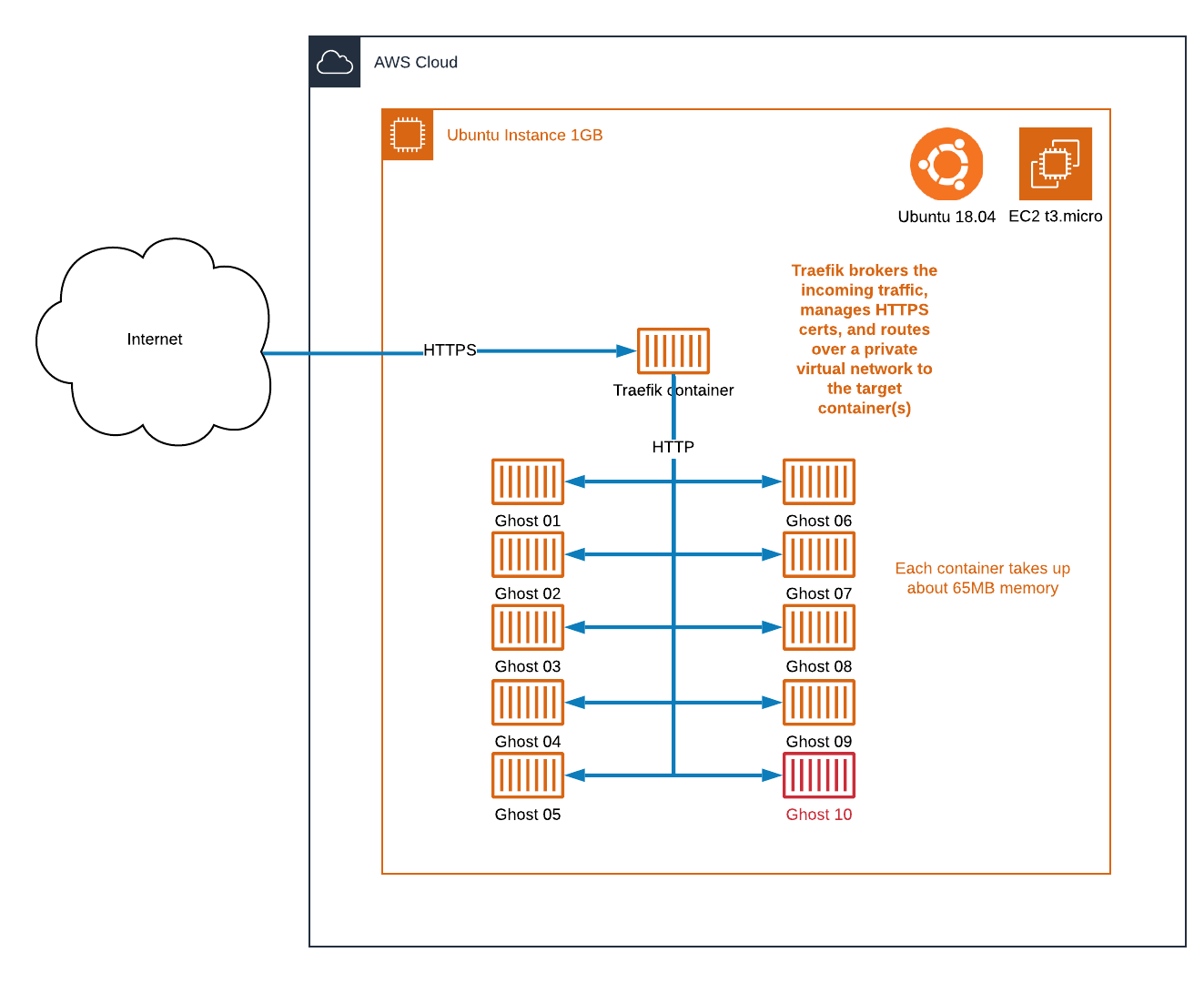
I have a kind of rudimentary "Ghost multisite" in the form of a Docker stack, so just how many Ghost blogs can I stuff into a single 1GB virtual server?


I have a kind of rudimentary "Ghost multisite" in the form of a Docker stack, so just how many Ghost blogs can I stuff into a single 1GB virtual server?
Stack test starting point
My starting position is with a test server I often scrub and restore on an EC2 t3.micro server, which has a minimal Traefik container, and a single Ghost container. Both are built on Alpine releases as per this article. Ghost is out of the box with the default articles and SQLite at the back end.
My memory footprint with 1 x Traefik and 1 x Ghost container is close to 309MB out of a total of 980MB. Ubuntu has around 175MB free and 495MB for disk buffering. Disk usage is 2.7GB but I don't expect disk space to be an issue so won't track it.
Webpage speed tests are returning the default 493KB welcome post in a respectable 1.5 seconds. This includes retrieving static content from the Ghost mothership and HTTPS overhead.
I have a DNS wildcard already in place so any subsites should get through no problem. e.g. *.mydomain.com sends to the same A record where the Traefik proxy is listening, managing HTTPS, and brokering the names.
Adding Ghost blog number 2
I jump to the docker compose file and append another entry similar to the first, adding a few "02"s here and there. Of course, replace mydomain.com with your domain. The volumes section is not essential for a disposable blog.
        gblog02:
                image: ghost:2-alpine
                restart: always
                environment:
                        - url=https://gblog02.mydomain.com
                volumes:
                        - /data/ghost02:/var/lib/ghost/content
                labels:
                        - traefik.backend=gblog02
                        - traefik.frontend.rule=Host:gblog02.mydomain.com
                        - traefik.docker.network=web
                        - traefik.port=2368
                networks:
                        - web
                depends_on:
                        - traefik
I run a docker-compose up -d and within seconds another blog is online. I browse the welcome page and note the memory use has jumped to 408MB.
Adding Ghost blog number 3.. 4.. 5..
I carry on appending blogs to my Docker Compose file.
Blog 2: 408MB, 99MB more
Blog 3: 475MB, 67MB more
Blog 4: 545MB, 70MB more
Blog 5: 607MB, 62MB more
Blog 6: 658MB, 51MB more
Blog 7: 704MB, 46MB more
Blog 8: 777MB, 73MB more
Blog 9: 834MB, 57MB more
Blog 10: 894MB, 60MB more
When I start up the 10th blog things start to go sideways. Docker Compose says it's creating the container, but then lo:
$ docker-compose up -d
traefik_traefik_1 is up-to-date
traefik_gblog06_1 is up-to-date
traefik_gblog07_1 is up-to-date
Creating traefik_gblog10_1 ...
traefik_gblog05_1 is up-to-date
traefik_gblog08_1 is up-to-date
traefik_gblog_1 is up-to-date
traefik_gblog02_1 is up-to-date
traefik_gblog09_1 is up-to-date
traefik_gblog04_1 is up-to-date
traefik_gblog03_1 is up-to-date

ERROR: for traefik_gblog10_1  UnixHTTPConnectionPool(host='localhost', port=None): Read timed out. (read timeout=60)

ERROR: for gblog10  UnixHTTPConnectionPool(host='localhost', port=None): Read timed out. (read timeout=60)
ERROR: An HTTP request took too long to complete. Retry with --verbose to obtain debug information.
If you encounter this issue regularly because of slow network conditions, consider setting COMPOSE_HTTP_TIMEOUT to a higher value (current value: 60).
Other commands are not well. Not well at all.
$ docker ps -a
runtime/cgo: pthread_create failed: Resource temporarily unavailable
SIGABRT: abort
PC=0x7fd2e04aae97 m=0 sigcode=18446744073709551610

goroutine 0 [idle]:
runtime: unknown pc 0x7fd2e04aae97
stack: frame={sp:0x7ffc644240c0, fp:0x0} stack=[0x7ffc63c25900,0x7ffc64424930)
00007ffc64423fc0:  0000000000000000  0000000000000000
00007ffc64423fd0:  0000000000000000  0000000000000000
...etc
Memory shown in top has me at 870MB used, fallen back from an initial spike of 894MB. It's a moving target now, but 46MB is allocated for buffering and 70MB free.
Something has recovered a little, and now basic docker commands are running.
$ docker ps -a
CONTAINER ID        IMAGE               COMMAND                  CREATED             STATUS              PORTS                                      NAMES
29baee6e33fd        ghost:2-alpine      "docker-entrypoint.s…"   7 minutes ago       Up 6 minutes        2368/tcp                                   traefik_gblog10_1
98d98f801bdb        ghost:2-alpine      "docker-entrypoint.s…"   8 minutes ago       Up 8 minutes        2368/tcp                                   traefik_gblog09_1
08c4f2f4d3fe        ghost:2-alpine      "docker-entrypoint.s…"   10 minutes ago      Up 10 minutes       2368/tcp                                   traefik_gblog08_1
b83f5176b212        ghost:2-alpine      "docker-entrypoint.s…"   11 minutes ago      Up 11 minutes       2368/tcp                                   traefik_gblog07_1
d70a67e0946c        ghost:2-alpine      "docker-entrypoint.s…"   12 minutes ago      Up 12 minutes       2368/tcp                                   traefik_gblog06_1
cb05d57b0d98        ghost:2-alpine      "docker-entrypoint.s…"   15 minutes ago      Up 15 minutes       2368/tcp                                   traefik_gblog05_1
be6b3beeefa9        ghost:2-alpine      "docker-entrypoint.s…"   17 minutes ago      Up 17 minutes       2368/tcp                                   traefik_gblog04_1
268b023133dc        ghost:2-alpine      "docker-entrypoint.s…"   18 minutes ago      Up 18 minutes       2368/tcp                                   traefik_gblog03_1
a68ba1655135        ghost:2-alpine      "docker-entrypoint.s…"   22 minutes ago      Up 22 minutes       2368/tcp                                   traefik_gblog02_1
3ed01d0bbf23        ghost:2-alpine      "docker-entrypoint.s…"   7 days ago          Up 2 hours          2368/tcp                                   traefik_gblog_1
8d027a97ed53        traefik:alpine      "/entrypoint.sh trae…"   7 days ago          Up 2 hours          0.0.0.0:80->80/tcp, 0.0.0.0:443->443/tcp   traefik_traefik_1
I run a page speed test for Blog 10 and it's chugging slightly but returning in 1.69 seconds. The original Blog is similar at around 1.65 seconds.
Removing the tenth Ghost blog
I remove the Blog 10 information from the compose file, then run docker-compose up -d --remove-orphans to clear back to 9 blogs. Memory returns to 798MB.
A speed test of Blog 9 comes back with 1.53 seconds.
Conclusions about stacking Ghost blogs
The average memory increase adding a Ghost V2 alpine container (today that's version 2.21.1-alpine) is 65MB. Having seen problems on reaching the 10th blog, we can speculate that around the 9-blog / 834MB mark is fairly safe for a collection of low-usage blogs. Anything more and we are bouncing off the top of the available physical memory and the consequences can be dire.
For a 2GB server, if the ~150MB memory headroom is constant, in theory the stack of blogs could get up to around the 24 mark, and around 15 blogs per GB.
However even with 9 there is an issue of blast radius to consider, with a sudden spike of traffic on any one it would impact all the others. Also that load of SSL termination and traffic brokering is channelled through a single Traefik instance, which has an unknown performance threshold. And of course, good old misconfiguration when you press the wrong button has the potential to take down quite a lot at once.
For me, I might start out with a single server, mixed with everything including non-Ghost containers. I feel the portability of a containerised deployment and separate data directories would allow me to migrate off into different stacks without too much pain. I will aim to keep at least 200MB headroom in low-load-state on my servers at all times.
Main photo courtesy of Iva Rajović on Unsplash
Retrospective blog post to use BlueSky for comments: techroads.org/filling-up-a... #Docker #GhostBlog
— TechRoads blog (@techroads.org) Feb 22, 2024 at 11:29 am
[image or embed]