
Runway AI evaluation - two seagulls fighting over a piece of toast
I'm on a quest to find AI video production products that can be used in an ethical way. This time I'm trying out Runway. I'll be forking over some cash to subscribe. My test video will be two seagulls fighting over a piece of toast!

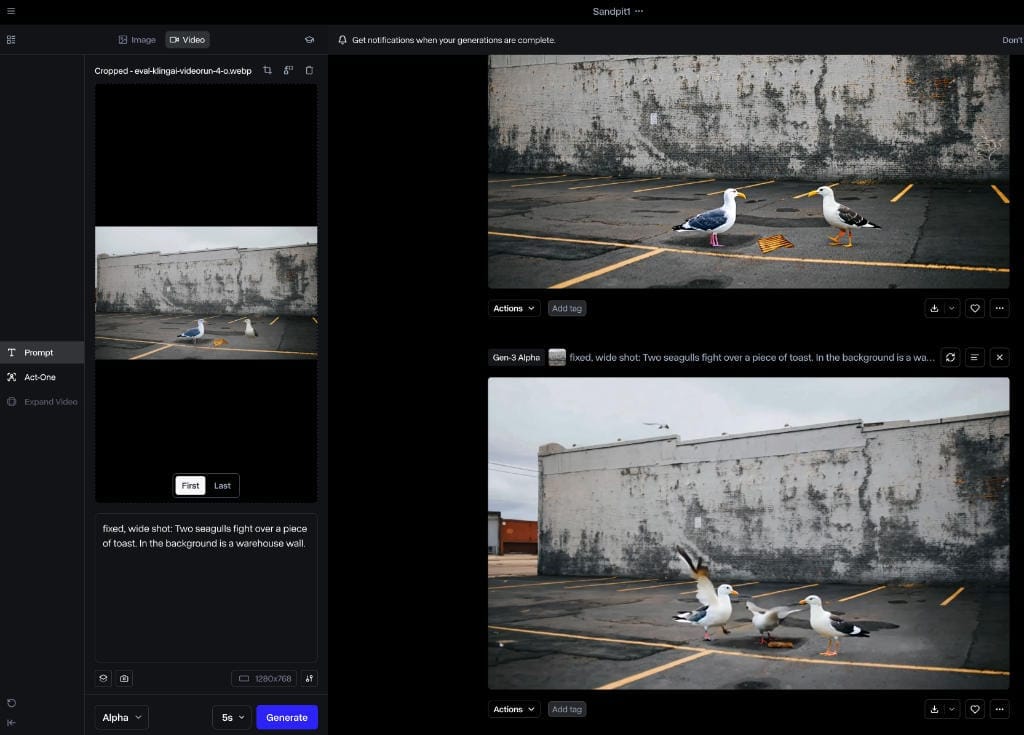
A series on ethical film + TV media production using AI tools
I'm evaluating AI tools based on three main criteria.
- Ethical AI, by which I mean I can use my own media as input. Generative tools mainly use media of unknown origin or consent, and the generated content is often subject to bias.
- A tool where I can perform shot composition
- Bonus - ability to feed in storyboard sketches to give shot structure or an animatic
Of course I'd need a lot more to create film: human motion, character consistency, lip sync, audio etc but the above are the fundamentals.
Seagulls and Toast
I'm going to test a number of products, which involves forking over some cash on low level subscriptions. My test video will be two seagulls fighting over a piece of toast, which is the opening scene of an indie film I'd like to make.
Runway
I'm starting out with high hopes for Runway. It looks like a big product, with some interest from big traditional studios. Unfortunately, though it does say Runway gives free trial credits: "Includes 125 Credits (one time)", when I signed up I had zero credits.
| Category | Detail |
|---|---|
| What is it? | Generate or adjust AI videos, "Frames" image generation for the wealthy (and only from text), Audio generation. |
| Free tier | No. Though you can look at paid-for things you've already made |
| Paid tiers | $US15pm starter (625 creds) with tiers at $35 and $95. Credits do not roll over. One of the more expensive offerings. |
| Ethical | Not so good. It will grudgingly take a single image as input to video generation |
| Shot comp | Does understand shot types but does not always do what it's told. Does not understand what a real Wide Shot is. |
| Storyboard input | Not really. No particular way to apply structure of a provided sketch that I could find |
| Ownership | US initially a VC child |
| Strength | Videos are reasonable quality with decent physics. Folders and sessions to organise |
| Weakness | Can't easily produce from my own media. Feels credit-hungry. Complex product suite with old versions alongside new, and deprecated products. |
| Generation speed | Fast enough, usually within a few minutes. |
When I asked Chat GPT which AI tools could take storyboard sketches as a guide for shot composition, it thought Runway Gen2 was capable. It turns out, it can't as such.
Registration
No problems with registering a private domain email. I switched to "monthly", subscribed to the $US15pm Standard level which imbued me with 625 credits, paid via Stripe.
Once you have a subscription, you can top up credits at a rate of $US10 for 1000.
Rates are as at March 2025.
Their credit system is a bit mean. Use or lose the credits every month, when they "refresh". There is no benefit to customers with this approach. It does have the slight whiff of complacency.
- Gen-2 video is 25 credits for 5s. Text generation allows first frame preview. Video generation from text or image or both.
- Gen-3 Alpha video is 50 credits for 5s. May generate from text or image or both.
- Gen-3 Alpha Turbo is 25 credits for 5s. Must be provided a start frame image.
- Gen-4 is 60 credits for 5s. Cough..
What I am going to try
- A quick text to video to test the default Wide Shot framing
- Creating a video of two seagulls fighting over a piece of toast based on a single input image of the background, and allow the software to generate the seagulls and toast to see what happens when it has a free reign.
- Creating a video of two seagulls fighting over a piece of toast based on a single image that I pre-composed in photo editing software with all the elements.
- Create separate videos for each element, and combine with the Runway timeline editor for layers
Navigation to get started
The screens are a bit deeper than say Sora. From the main dashboard, a left sidebar is sectioned into Home, (sessions and showcases), Assets (Private, Shared, Favourites) and Tools (Generate Images, Generate Video, Generate Audio).
There is also, frighteningly, an All Tools button with 36 different tools underneath. Runway does suffer from just piling on new releases of things. Gen1s, 2s, 3s of a tool stack up, each with increasing features and credit cost. A big part of learning Runway is going to be figuring out which tools are minimal for the constant refining and re-running that's needed to produce in AI.
After a quick diversion to create a Session called "Sandpit1", I begin by jumping into the interface for my main objective - Tools > Generate Video. One of the first decisions is which video generation to use.
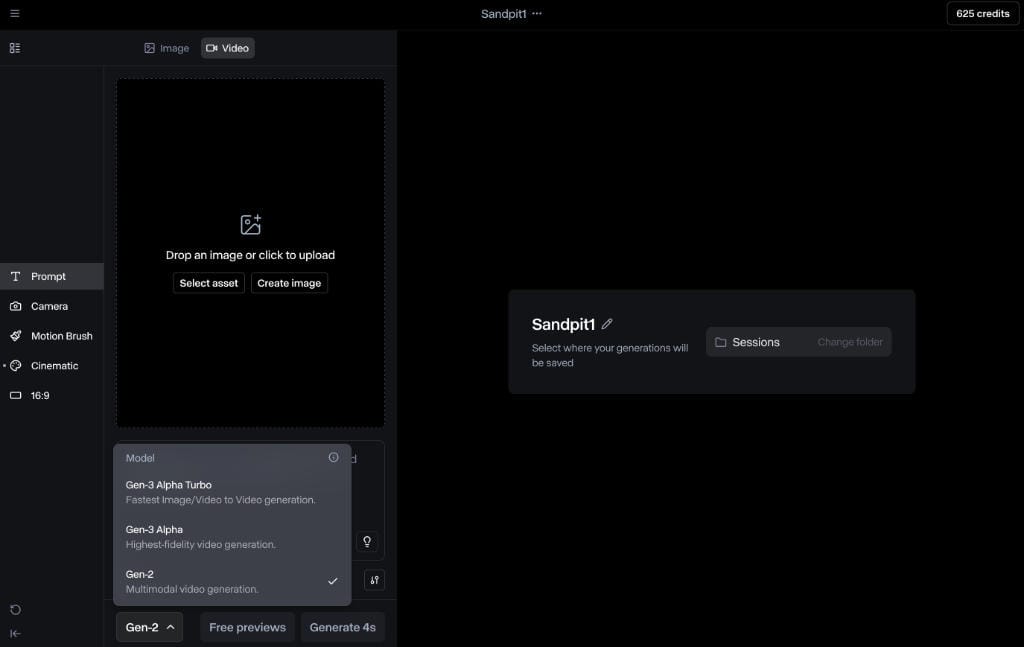
I have choices of Gen-2, Gen-3 Alpha, and Gen-3 Alpha Turbo. I make an important discovery. If I choose Gen-2, a "Free previews" button appears. This allows free generation of the first frame.
Basic text-to-video Wide Shot test
Sadly many of these tools don't follow basic filmmaking shot composition, so just a quick first test, using this prompt.
Wide shot, fixed camera, a woman standing in a field.
As it's a text generation I can use the Free Preview, which comes back with this.
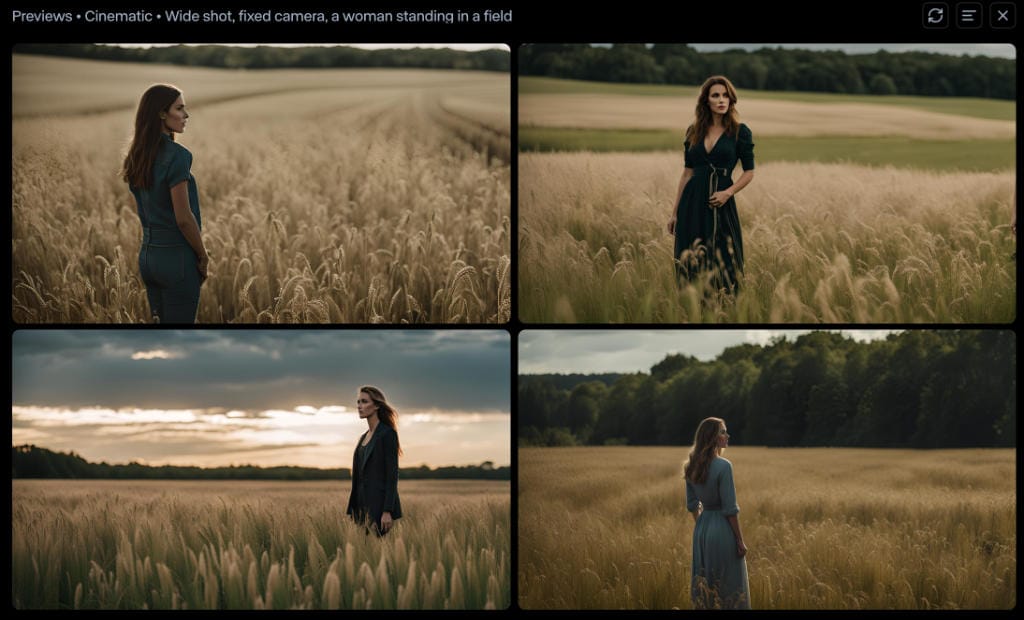
They look nice but, technically, none of them are a wide shot, which should have the subject in the distance. That's a fail. Gen 3 or Gen 4 may behave better but I am skeptical.
First test: Allow generated seagulls
First image-to-video run
For the first run I upload the warehouse wall background photo. Then I enter the prompt:
Two seagulls fight over a piece of toast. In the background is a warehouse wall. The camera is fixed.
Out of interest I pressed the prompt enhance text button, and got this.
Two seagulls squabble fiercely over a golden piece of toast, their wings flapping wildly. Behind them, a weathered warehouse wall looms, its bricks cracked and covered in faded graffiti. The scene is bathed in the warm glow of a setting sun, casting long shadows on the gritty pavement.
But no. That's cooked. I go back to the original prompt. It's possible my "camera is fixed" statement is redundant as there is a manual camera controller.
Annoyingly, I can't use the free preview. I'm told that the "image provided would be the first frame", the free preview is for text only. The image prompt is intended to be a composite frame. I tried it like this with the "wall-only" photo, and the output was awful - 4s of nothing but wall. It really wants the provided image to be the first frame.
Gen-2 text to image to video run
I remove the image and run with just the text prompt. Not what I would ever do for an actual production but at least gives me something to compare to. It allows me to do a free preview of the first frame now, thus.
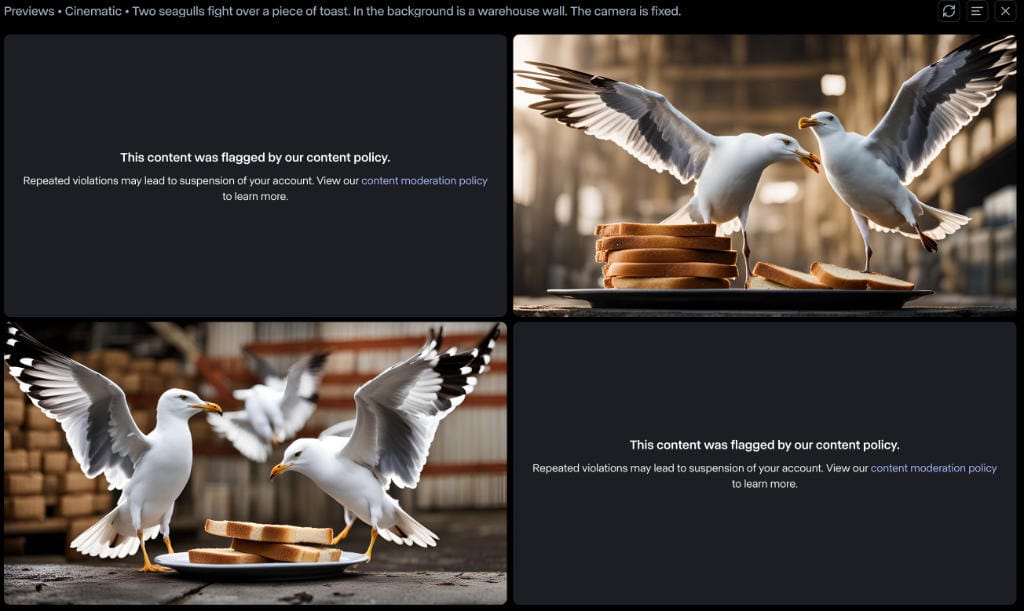
Curiously it blocked two of the images that it created. I guess it was seagulls fighting each other. But, the clarity is excellent. Eventually I get to:
fixed, wide shot: Two seagulls try to eat the same piece of golden toast on the ground. They are outside in an open-air carpark. In the background is a white shabby warehouse wall.
This produces some passable first frames. However, this is very much not a wide shot.
I give one as the image prompt, and generate. It's rubbish. So now to test the same with ..
Second run, Gen-3 Alpha Turbo image and text to video
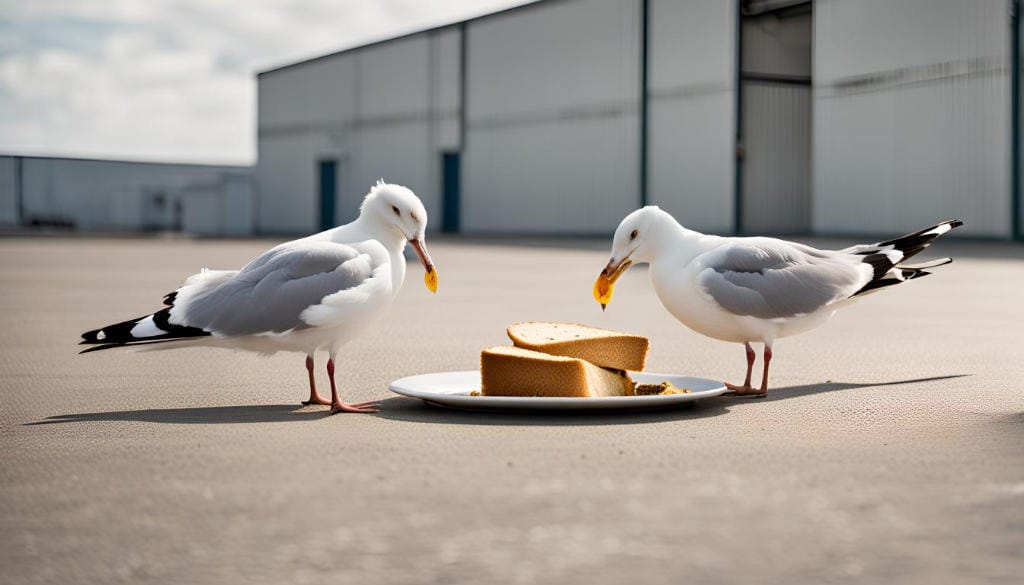
Gen-3 Alpha Turbo is the express version of Gen-3. It's mandatory to give it an image to start with as a first frame. So I give it this seed image from the previous first-frame-fest:
And this text:
fixed, wide shot: Two seagulls fight over the same piece of golden toast which is sitting on the ground. They are outside in an open-air carpark. In the background is a white shabby warehouse wall.
It makes this video. Embedded WEBM - may need a desktop browser to view.
Visually, it's very good quality. The main problem is that the "fight" is more of a cordial tea party. "After you. No, after YOU." The existence of the plate is the fault of the earlier Gen 2 text-based first-frame creation, which doesn't have a negative option to subtract things.
So everything so far was generated assets by Runway, which I don't want anyway (see intro) so enough of these shenanigans and on to..
Second test - provided precomposed image
Third run - my precomposed image - Gen 2
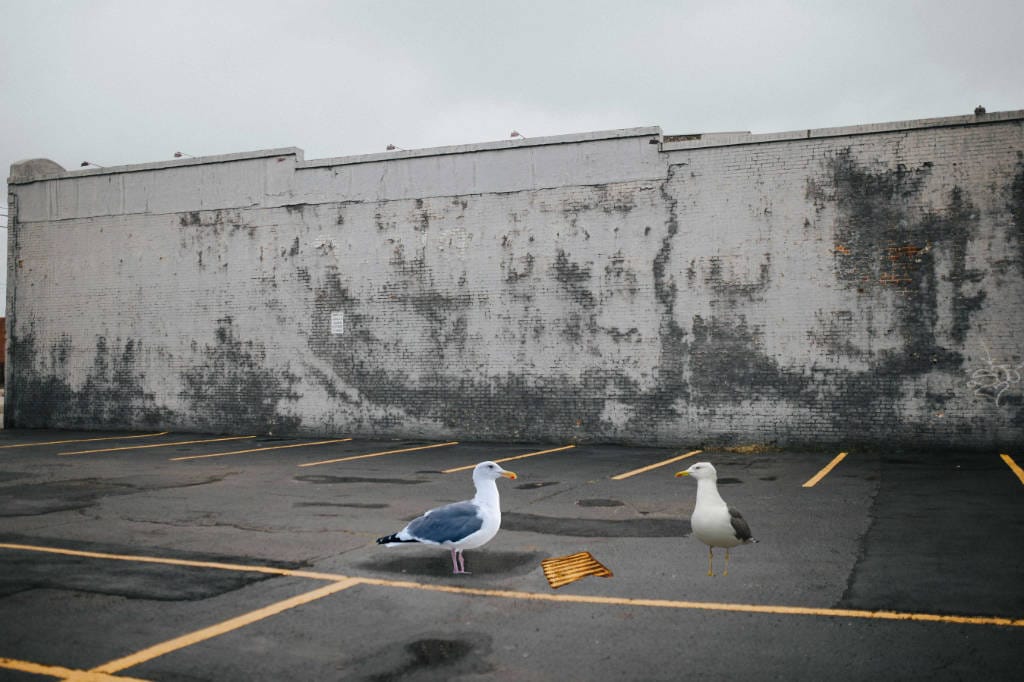
This is closer to ethical. I don't in the long run expect to precompose an image in this way, but let's try it based totally on a first frame I have provided. It's rough, and it's this.
The prompt is this:
fixed, wide shot: Two seagulls fight over the same piece of golden toast which is sitting on the ground. They are outside in an open-air carpark. In the background is a warehouse wall.
This generation was a fail. The left seagull walked right and just kind of merged into the right seagull.
Fourth run - my precomposed image - Gen3 Alpha Turbo
Using the "poor mans" Gen-3, turbo, I tried the same image and prompt.
The AI found the seagulls which then just kind of walked towards each other. Fail.
Run 4B: I cut back the text to just say:
Two seagulls fight over a piece of toast. In the background is a warehouse wall.
The seagulls just kind of walked towards each other and touched beaks. Fail. Without the camera instruction, it felt the need to zoom right in. Annoyingly. Though I since discovered there is a static camera selector.
I figure, either there is something specific blocking the supposed violence of "fighting over" a piece of toast, or the AI just doesn't understand the concept of two animals both trying to get the same piece of food. So one more go.
Run 4C: Same seed image with:
fixed, wide shot: Two seagulls tug at a piece of toast. In the background is a warehouse wall.
Surely tugging at the same piece of food can be understood? I generate and .. nope, a fail.
It just doesn't understand two birds fighting over some toast. So far, Sora and Kling both kick Runway's ass for this particular action.
Fifth run - my precomposed image - Gen3 Alpha - the premium product
Gen3 Alpha is expensive at 50 credits for 5 seconds, double the other tiers. I'm going to switch the text back to "fight" and give it a try.
fixed, wide shot: Two seagulls fight over a piece of toast. In the background is a warehouse wall.
Well here it is. At least one of the birds twitches, before splitting and leaving three birds. But, a fail.
Sixth run - my precomposed image - Gen-4 "Athena"
Reflecting the high rate of change in these products, since I first wrote this a few days ago, Runway have released Gen-4 of their video generation product, dubbed Athena. Compared to the others it's an eye watering 60 credits for a single generation. I burn the credits so you don't have to, fair reader. As you would expect, they just pile it on top of the three other "Gens" making a confusing four to choose from.
This is the prompt:
fixed camera, Two seagulls fight over a piece of toast.
And this is the resulting video embedded in WEBM format.
As you can see, the camera is not fixed, and the action well.. sucks. Fail.
Third test - compose with individually crafted videos
This method is convoluted but would meet my criteria of using only media that I've supplied.
But wait, the Academy video on extracting a subject from one video and placing it on another "Gen-2 Compositing Workflow" is out of date. The functions are no longer available in the Edit section. Or in Gen-3.
I then find the Remove Background / Green Screen app in the app bucket. It has two names. I go to try it and the selection pen does not select. Referring to the Green Screen help pages, it seems that it's deprecated. But hasn't been replaced by anything. I can't trust this as a main production workflow.
This is common in Runway. Apps and features of various ages piled together, no backwards compatibility, manuals describing features that don't exist. In particular, with the disappearing remove background / place on timeline / layers, I'm not going to be able to achieve using all of my own media. I imagine their strategy is to move fast and break things. While leaving a "hunt the functionality" mess and multiple versions of the same tools.
This option is a fail. I should say, a fail in March 2025, the landscape changes fast.
Storyboard check
For my bonus wish about taking a storyboard frame as input, I loaded up a crappy sketch of a wide shot composition, three people standing in a queue.
It uses this as a first frame, but even with an instruction that there are three people just standing there, it redrew using it's own sketch style and colour. So not great for extrapolating existing art or creating an animatic.
An extra utility - image to image
Buried in the bucket of unloved, superseded and weird Tools is one called image to image. It does allow a measure of image reimagining. I couldn't get it to take a storyboard image and re-image into a frame suitable for video seeding.
It does however seem to be a worthy utility for altering type, say from cartoon to cinematic. The text prompt is a little different, looking for a description of the type of transformation you want to make.
Wrapping Up
For my particular usage, I'm underwhelmed with Runway.
The generated assets (birds from text) are of reasonable quality, but media I have supplied are not handled well. The limited physics that were applied were realistic, but not doing what I wanted them to.
Shot composition was good on paper, but just didn't do what it was asked half the time. I could not get text generated shots to generate a wide shot and a small subject in the distance.
I couldn't find a way to use storyboard sketches to guide composition of a shot or make use of the given shot type.
By its nature (but it's not just Runway), AI tools need endless amounts of experimenting with prompts. The Gen-2 free preview was good but only worked generating from text. Otherwise, the credit burn to keep retrying with the Gen-2 image prompt and Gen3 levels - and now Gen4 - the current release - felt a bit high. Add in the premium cost to compose Images and it's one of the more expensive AIs.
For my use case, it's not the right tool.
Runway AI evaluation for ethical video production. A blog post👇 "Runway AI evaluation - two seagulls fighting over a piece of toast" This skeet is the "comments" for the article. #AI #Filmsky techroads.org/runway-ai-ev...
— TechRoads blog (@techroads.org) March 26, 2025 at 4:13 PM
[image or embed]