
Two seagulls fighting over a piece of toast - Kling AI evaluation
I'm going to test a number of AI video production products, including forking over some cash on low level subscriptions. My test video will be two seagulls fighting over a piece of toast. I'll start evalations with Kling AI.

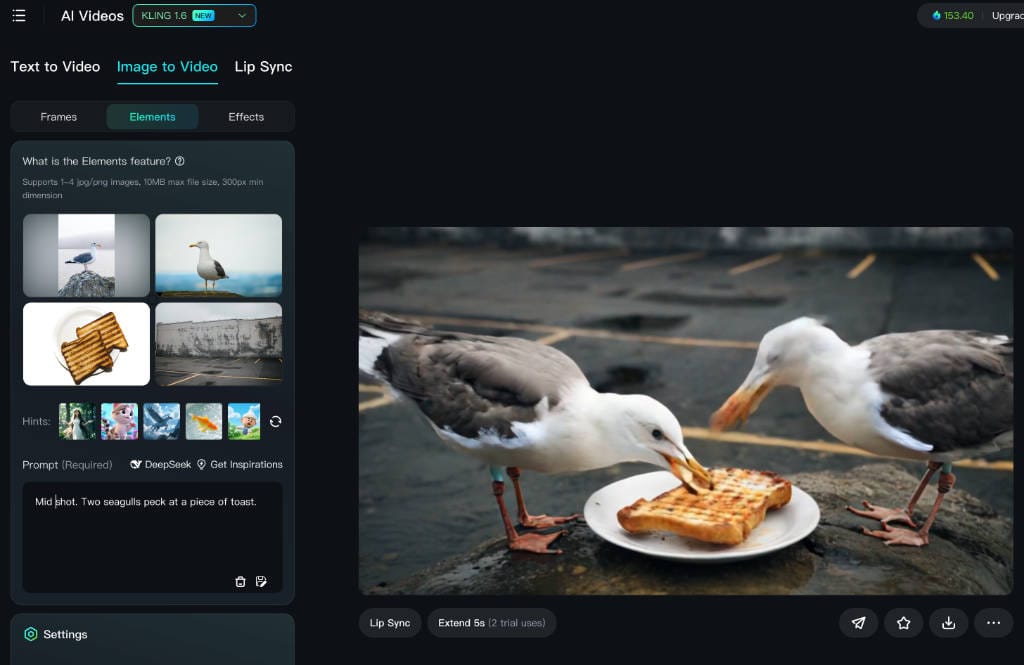
A series on ethical film + TV media production using AI tools
What do I mean by ethical AI? For my purposes, this is where I control the input media. Gernerative AI (i.e. text prompt to create image or video) makes use of media with an unknown origin or audit trail of release consent. I have no way of knowing if the creators of the media have not been exploited.
Being able to use your own media doesn't mean that a provider is ethical, just that they allow you to be. Somewhat.
My second measure for an "ultimate" AI video maker is one that I can apply traditional Film/TV control around things like shot composition. Bonus points if I can find an AI that can take a storyboard sketch and use it for composition structure. It may be that in the AI "race" for video production, the winner will be the one that can best replicate film making techniques.
My objective is to build a reliable AI production workflow for film or TV.
What I'll try out
I'll mostly focus on post-Screenplay production. That is, from a storyboard onwards. I won't dive in too much on audio and lip sync at this stage, the essential for now is shot composition.
Worst case if one tool does not fit all, I can make use of a secondary AI just for the vocals aspect. As with video, I would look to be using actor provided voice audio and not AI generated. Or at least audio with a consent audit trail.
I'm not receiving any particular link food and don't have any affiliations. I hate being forced to watch YT videos for information so I'm not going to make you watch any, either.
Seagulls and Toast
I'm going to test a number of products, including forking over some cash on low level subscriptions. My test video will be two seagulls fighting over a piece of toast, which is the opening scene of an indie film I'd like to make as a start.
For this first edition, I'll start evalations with:
Kling AI
| Aspect | Info |
|---|---|
| What is it? | Generate AI images and videos from text and image prompts |
| Free tier | Yes, indefinite, free credits. Credit topups allowed. |
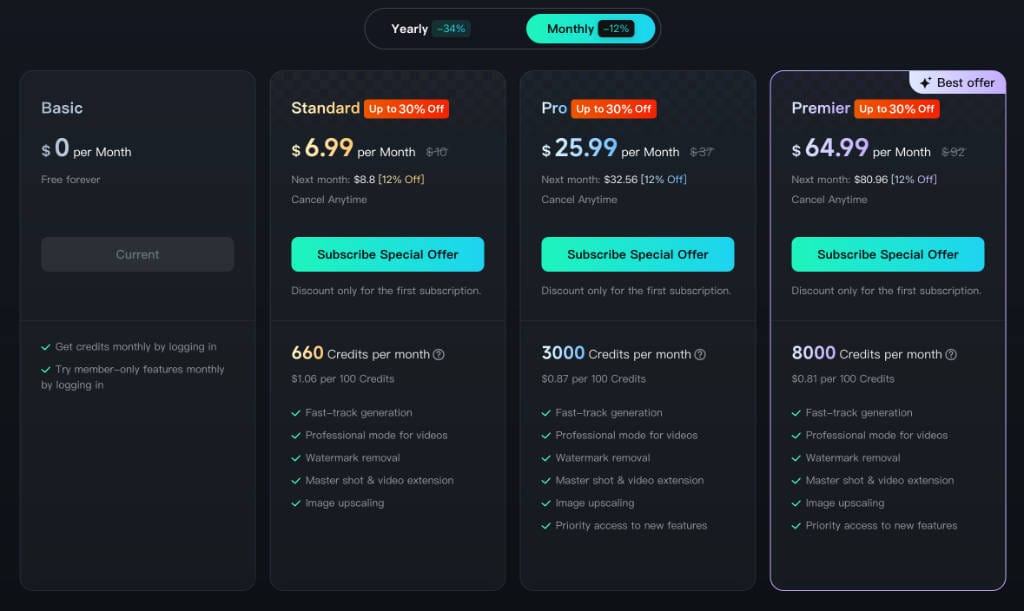
| Paid tiers | Starts at Standard level $US8.80pm, with tiers at $32.50 and $81. Credit topups allowed. |
| Ethical | Good. Can load multiple images for composite video with "Elements" |
| Shot comp | Does not understand what a Wide Shot is, always fills the frame with the subject |
| Storyboard input | Not really. No particular way to apply structure of a provided sketch that I could find |
| Ownership | kuaishou.com - seems Chinese |
| Strength | The Image-to-Video allows up to four Elements images. When the physics is good, it's good. Storyboard to animatic, maybe. Full range of actor, voice, lip sync tools. |
| Weakness | Image precomposition poor. The physics seems random. e.g. Quantities of birds, on screen artefacts. |
| Generation speed | On free credits after a few runs slows way down (to take hours). Speedy ish (a few minutes) on paid levels |
Registration
Registration is not great, I got blocked using a duck.com address. That's fair enough as people could create disposable email addresses to repeatedly get trial credits. But Gmail or Yahoo? I mean, euw.

But then, when I attempt to register with a private domain address it also gets rejected. I have to wonder how many small studios have tried their studio email addresses and just given up when confronted with this. I persevered and registered with a webmail domain address.
The testing I will go to detail on:
- A basic wide shot test, from text.
- Creating a video of two seagulls fighting over a piece of toast based on four separate images. Uses Elements feature.
- Creating a video of two seagulls fighting over a piece of toast based on a single image that I pre-composed with those elements in photo editing software.
- See if I can do anything useful with a storyboard sketch
What I'm not doing - character video, lip sync or audio work. Maybe in future. I did a bunch more with Kling around characters and framing and it didn't do too badly.
Basic wide shot test, from text
While reviewing so many AI video production tools it became apparent that usually, they have no concept of actual filmmaking shot composition. For each, I'll do a simple text to video creation with this text. No media supplied by me.
Wide shot, of a woman standing in a field. Fixed camera.
It produces a 5s video, this is a screen grab near the start.
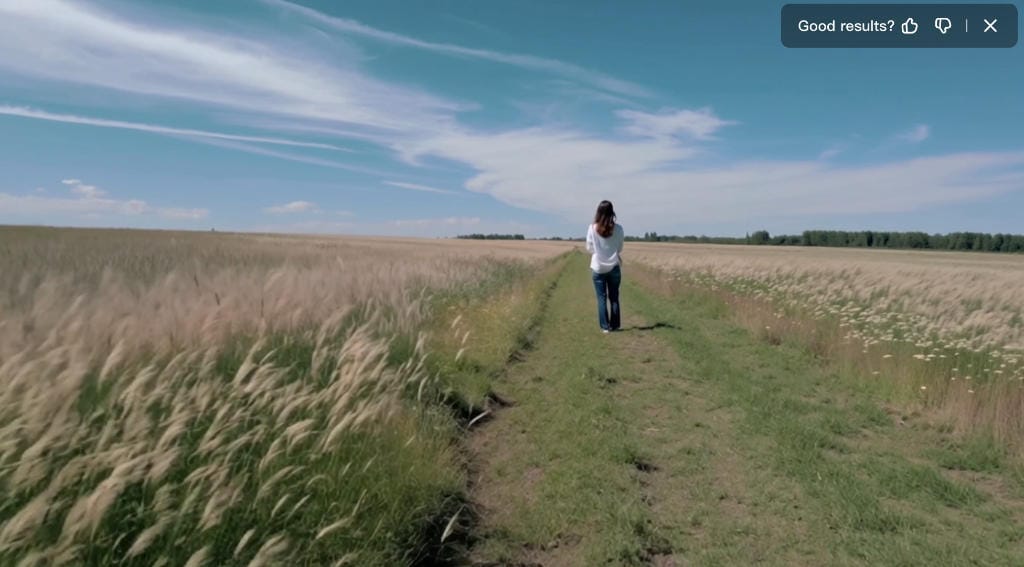
So, it has created a wide shot. This is a limited success, it's in "text to video mode", as I am unable to get it to do this in any "image to video" mode.
It ignored the "fixed camera" for a flying zoom in, motion is a fail.
Create a seagull video based on four separate "elements" images
I have sourced four import images from creative commons licensed pictures. Two seagulls, some toast on a plate, and a background with the side of a building.
Navigation is from the dashboard to AI Videos - other options are AI Images, and AI Custom Model which is access from other paid plans.
Once in the AI Videos menu, Elements can be selected to allow four images as inputs.
First Image-to-Video run
My first attempt was with the text prompt:
Mid shot. Two seagulls peck at a piece of toast.
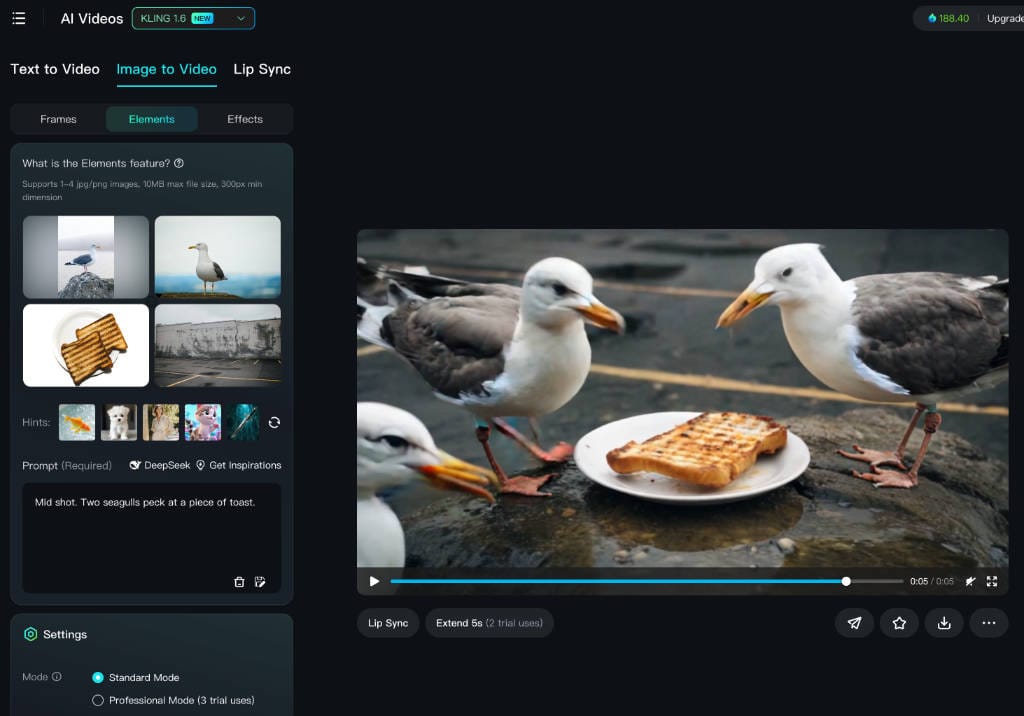
The first run was a disaster:
- Kling AI doesn't understand what the framing for a mid shot is. There is no particular feedback about which parts of the text it doesn't understand.
- By default the AI framing waves the camera all over the place. It started pointing at the sky and panning down.
- The white plate that was under the toast (see image) was included. It didn't "extract" the toast
- There were two main seagulls but others kept appearing. The 5s shot opened with two on the roof, then the camera pans down to the two pecking, and a third wanders in from the left. It's not just Kling AI guilty of this as you will see in my other reviews. You say you want two seagulls, and you get three, of five, or more.
Second Image-to-Video run
For the second run I used the text:
Fixed camera. Two seagulls fight over a piece of toast, warehouse in the background.
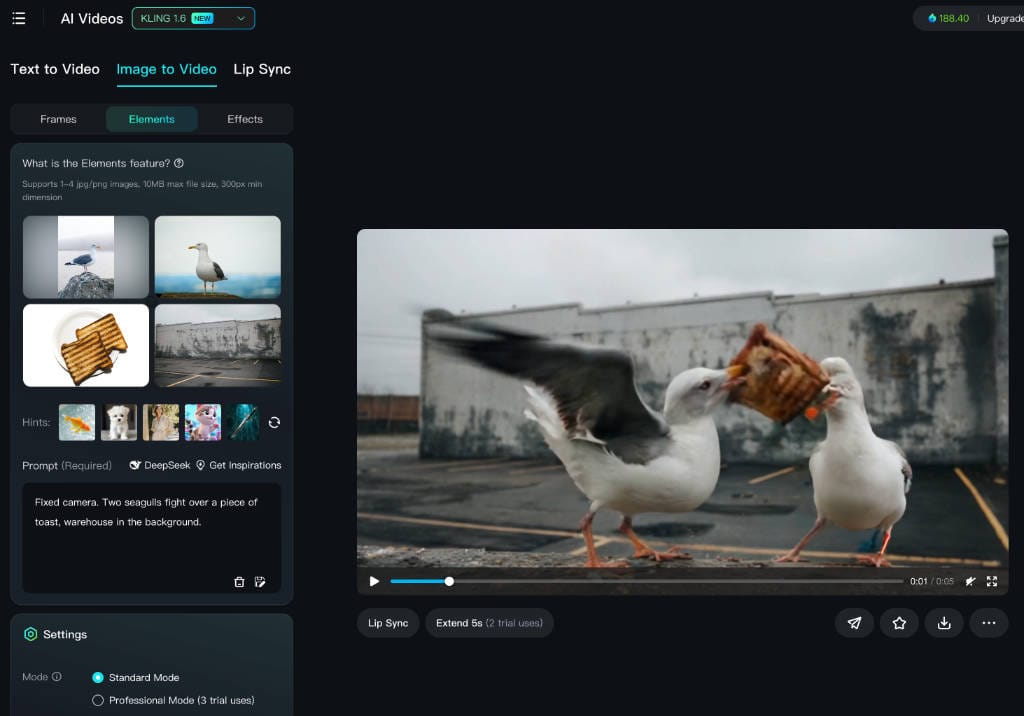
The biggest win was the phrase Fixed camera. It actually worked and the camera stopped waving around. And there were just two seagulls. I changed peck to fight, and the action changed, so the AI understands the word fight.
You can't see it as it's off the bottom of the screen shot, but there is an optional Negative Prompt box. In there I've put:
White plate.
..and it's successfully removed the plate.
If you freeze on any particular frame, it looks rough, but in motion it's not too bad. Still obviously AI, but not too bad. Here is the video embedded in WEBM format [may need desktop browser]. I've reduced the bitrate.
Standard mode seagull fight - 5 second video
Kling AI allows removal of the watermark with any subscription.
Second Image-to-Video run - Professional mode
I decided to re-run this exact same spec, this time in Professional mode, which cost 35 credits instead of 20. Unfortunately, as you can see it's worse than standard mode.
While it is framed a little further back, the action is choppy as hell with artefacts all over the screen. So, it's a bit "pot luck" with the physics for any of these options.
Professional mode seagull fight - 5 second video
Third Image-to-Video run
The framing for this is not great - by default it just fills the screen. In my eventual film I'd like it to be framed way back, a classic Wide Shot. i.e. the seagull fight is a small bit of action in the distance.
In the documentation (dodgy link) it says you can give camera instructions such as "ultra-wide angle shots" among others. But does not say what the "others" are.
Daring to burn another 20 credits, I modified the previous to be:
Fixed camera, wide angle shot. Two seagulls fight over a piece of toast, warehouse in the background.
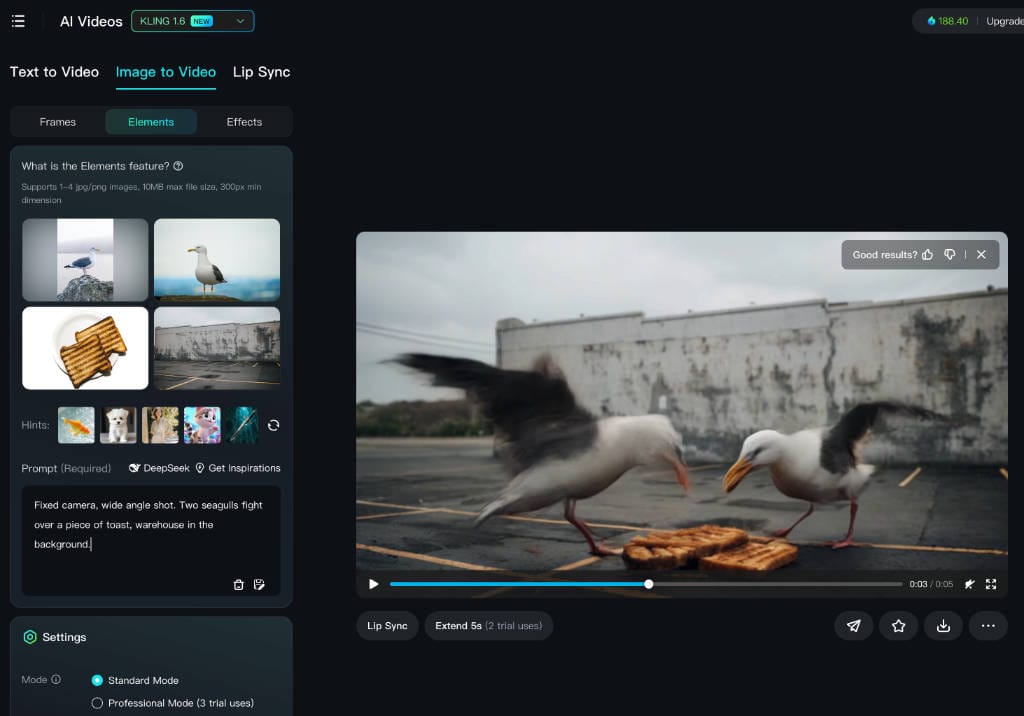
The result was not a wide shot. Farewell 20 credits. It did remove the kind of mound the gulls were standing on, but otherwise the main action was more jilted than run 2, with a couple of artefacts flashing in mid air.
Create a seagull video based on a single precomposed image
To be clear, in order to do this I had to dick around in photo editing software to precompose the image, which I would not expect to do for every shot in a full length film. The main reason I've done this is to have something to compare to other AI video apps, as many don't have the "Elements" equivalent to feed in more than one image.
So this is the thrown together image I will feed in. It's rough - the point is to do things fast.
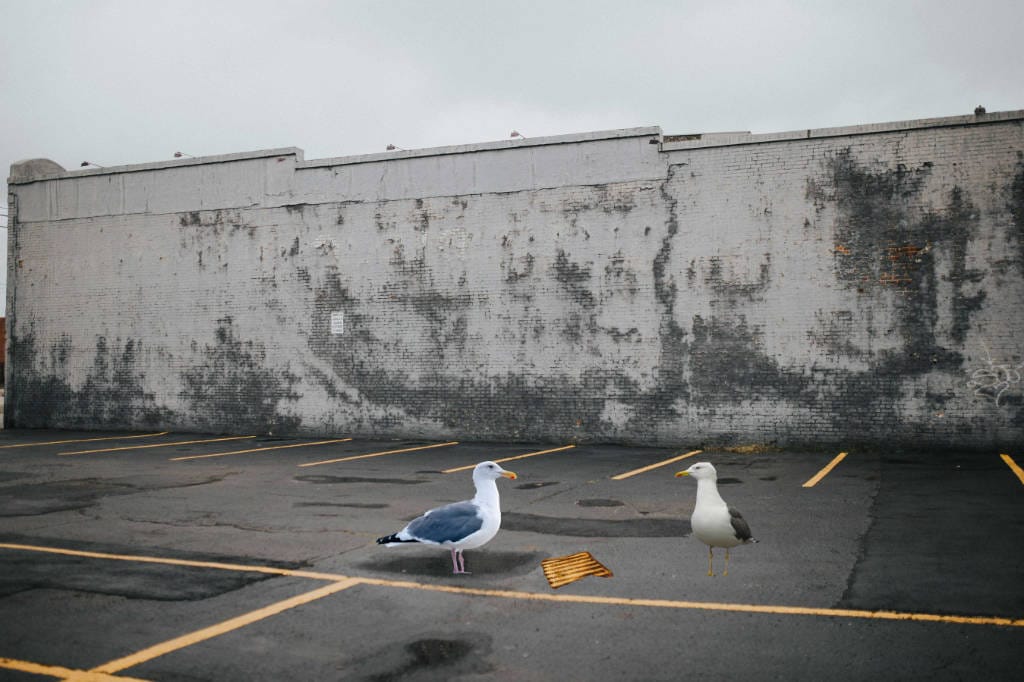
I change from Elements to Frames and load the single picture, with this prompt.
Fixed camera, wide shot. Two seagulls fight over a piece of toast, warehouse in the background.
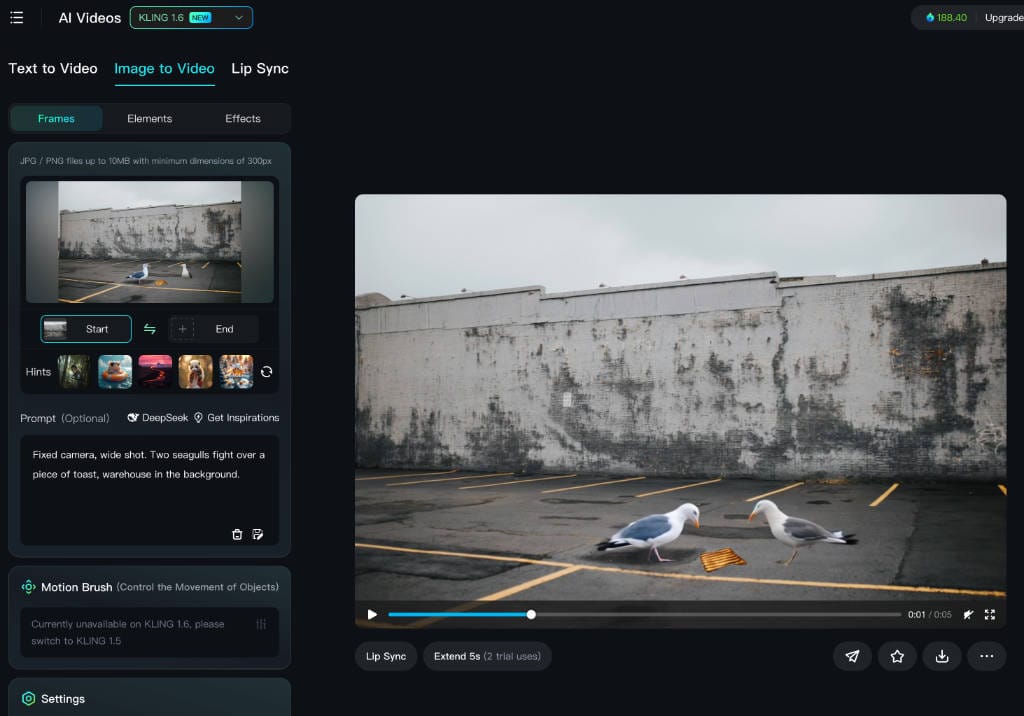
The result is not bad, though a few conspicuous screen artefacts. The wider framing of the image sticks. The problem is needing to precompose the image in the first place.
Here's the video.
Seagull fight from pre-composed image - 5 second video
Kling AI does have an "AI Images" creation section, with a "Text to image" module. It uses a Kolors engine as opposed to Kling, whatever that is. In there you can add a single image to support a text description, but there is not way to precomp a scene with multiple images to pass on to the video builder.
Price Plans as at March 2025
Storyboard sketch
I tried feeding it a sketch unrelated to seagulls, with people standing in a line.
The Settings have a slider with Creativity at one end and Relevance at the other. If I slide it fully to the Relevance end, it does create a five second clip mimicing the same crappy art style. From there, it becomes a matter of tuning. Generating an animatic from the sketch with the same shot composition becomes possible.
So not bad, Kling, not bad.
Wrapping up
I wouldn't rule out a different tool altogether to precomp in future, to then pass to Kling AI as part of a workflow.
It's important to note I have done these tests in "standard" mode except for the one noted above. For a few more dolleros they do have a Professional mode which they claim has better physics, but the actual physics it generates seems pretty random.
They also have an AI Custom Model section that is greyed out, which is only available to Pro level +. Their own docs don't have much but third party articles describe it as the ability to train an AI character based on a video, in order that it looks consistent in every shot. It costs 999 credits (on sale) per character.
They have over 100 free credits so it's worth having a tryout yourself. I hope you enjoyed this YouTube-free post!
Two seagulls fighting over a piece of toast - Kling AI evaluation Blog post 👇 This skeet is embedded in the post for a pseudo-comments system. #AI #filmsky techroads.org/two-seagulls...
— TechRoads blog (@techroads.org) March 23, 2025 at 1:51 PM
[image or embed]